Your operation,
on the record.
Dump a shift note, a vendor call, a work order — in your own words. Trove files it into tasks, asset history, and dates, briefs you every morning on what's slipping, and can still tell you in six months who said what.
You're managing more than any system can track.
You're not disorganized. The stuff just lives in too many places — texts, emails, whiteboards, and whoever happened to be standing there.
Throw information at it.
Trove does the rest.
Paste a note, a work order, or a rambling stream of consciousness. Trove reads it like a person and turns it into structured action — without you touching a form.
Real transcript. One sentence in — filed, dated, on the record.
Ask your schedule.
Get it the instant you hit enter.
“What's coming up?” “What's overdue?” “Tuesday.” Trove answers schedule and status questions straight from your data — no spinner, no waiting on the AI, and it never counts toward anything. The thinking is saved for when you actually need it.
Real screens. Real plant.
These aren't renders. Every pixel below is Trove running — the morning brief, the capture conversation, the task board.
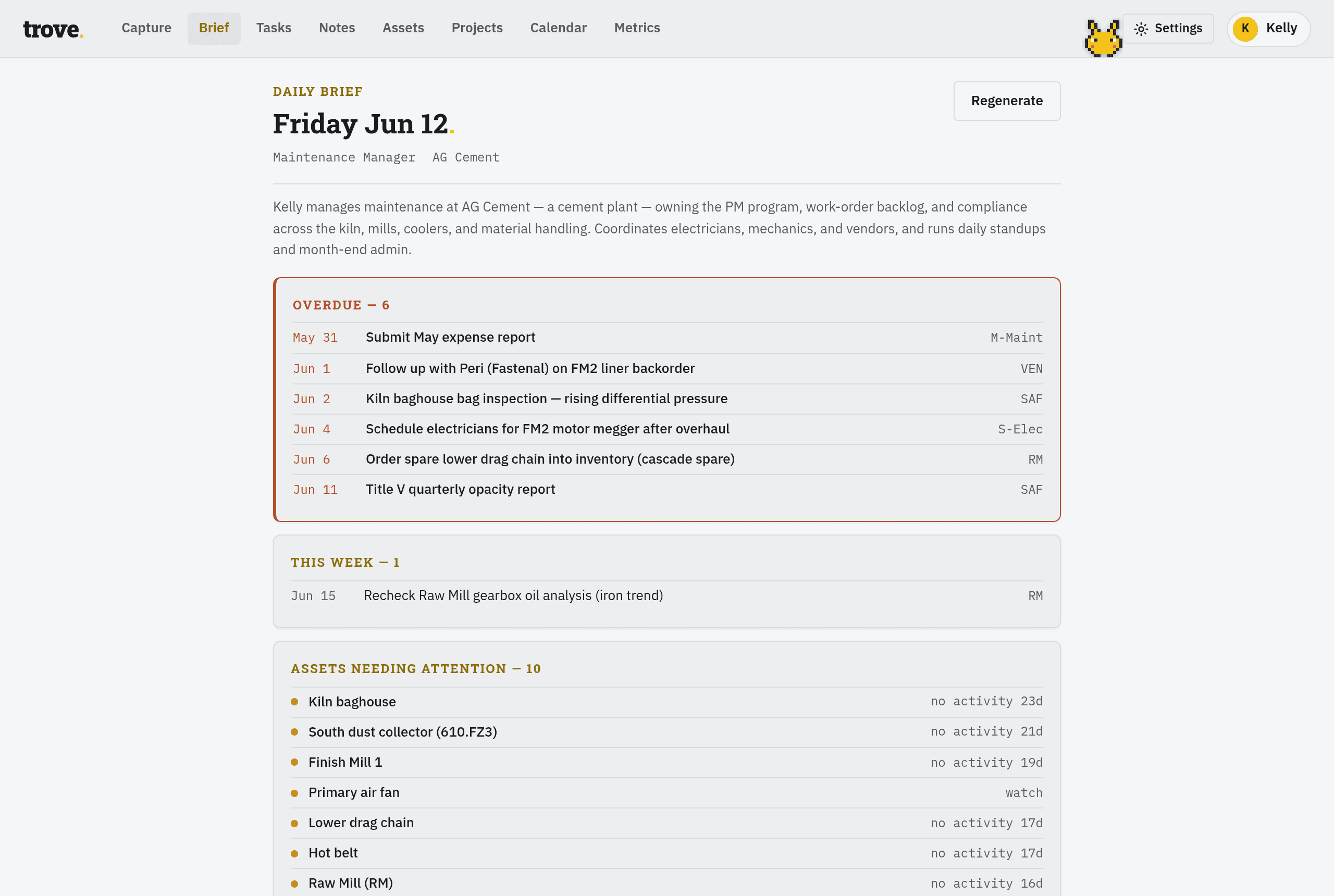
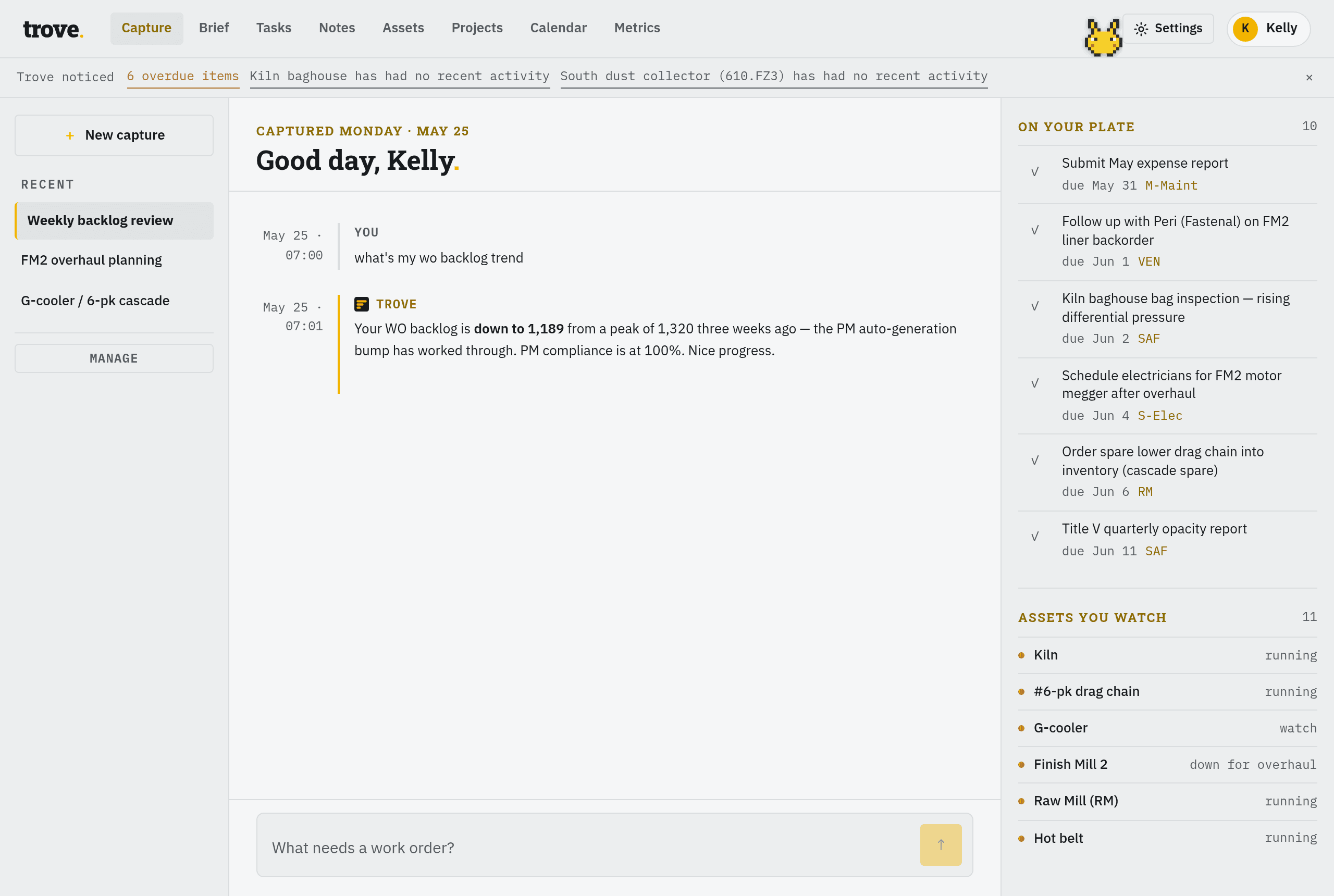
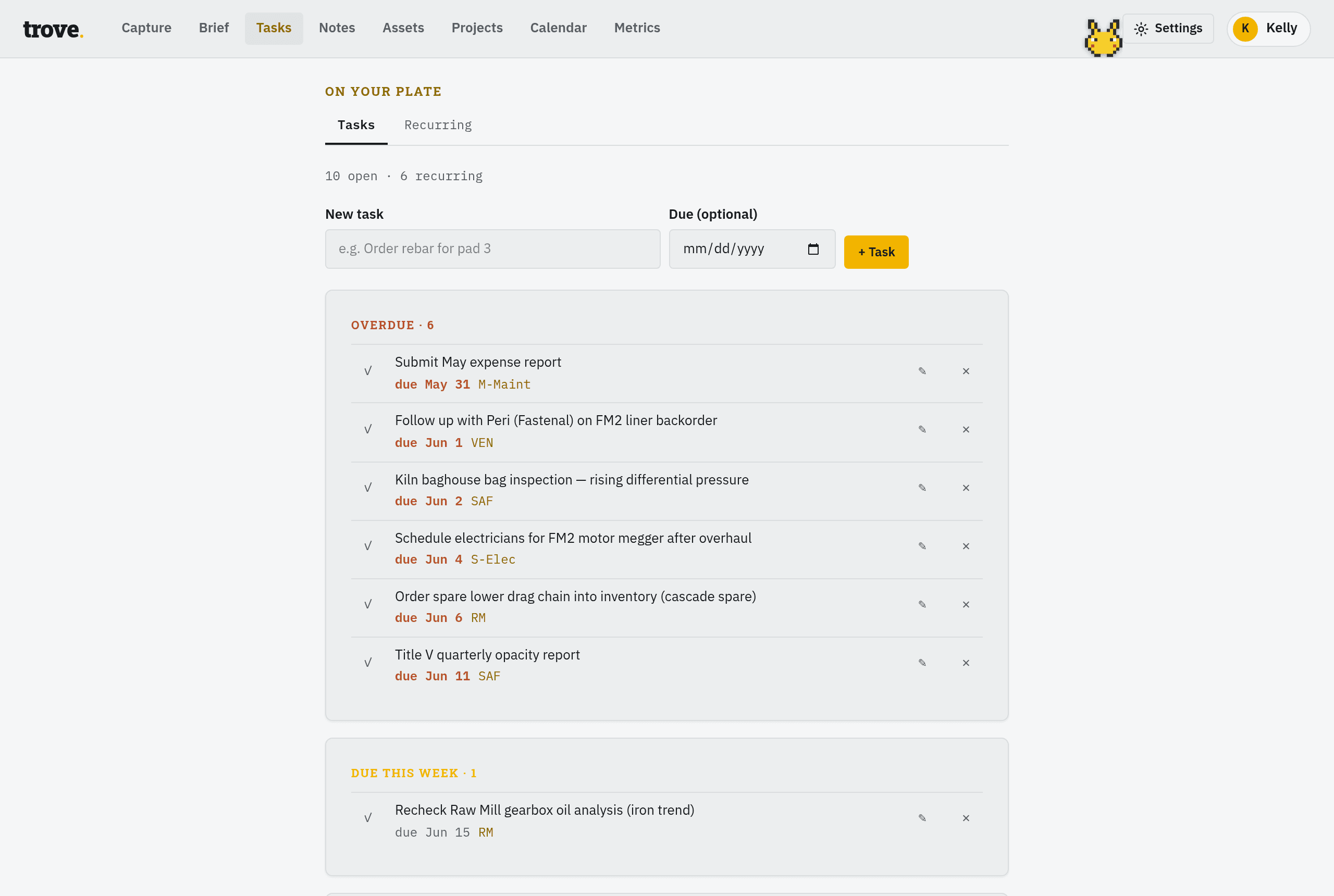
Captured from the founder's own instance — the demo data is a working cement plant, not lorem ipsum.
Capture anything
Type, paste, or dictate. Work orders, SOWs, shift notes, vendor emails — Trove reads the context and extracts the signal. No forms, no categories, no filing.
Morning brief
Start every shift with a generated briefing: tasks by urgency, what's due today, and a plain-English summary of where things stand. Fresh every morning.
Recurring obligations
PMs, inspections, certifications, monthly reports — add them once and Trove tracks the cadence. Nothing slips between shifts or across quarters.
Jobs & notes
Log work against jobs, capture meeting notes, record decisions and follow-ups. Full history of each job — who said what, when, and what happened next.
Shift handoffs
End of shift, dump what happened. Trove turns it into a clean record — what's open, what's pending, what the next crew needs to know.
Metrics
Track the numbers that matter: WO backlog, PM compliance, overtime, uptime. Alongside the narrative context that explains what the numbers mean.
Trove noticed
Trove watches what's slipping — overdue PMs, breaching certs, jobs gone quiet — and surfaces it before it bites. Optional push to your phone when something needs you.
On your calendar
One-way, Trove → calendar. Connect Google and changes push in near-real-time. Or subscribe from Apple, Outlook, or Google with a read-only feed your calendar refreshes on its own schedule — typically every few hours.
Learns how you work
Correct Trove once and it remembers. It adapts to your vocabulary and your operation — maintenance, construction, field, whatever you run — so it fits you, not the other way around.
Nothing's ever lost
Delete anything and it lands in Trash, recoverable for 30 days. Export everything, anytime. Your operational record stays yours.
Maintenance managers juggling work orders, vendors, and compliance windows. Plant supervisors who need the full picture across shifts. Field operators who deal with more in a day than most people handle in a week.
Run a different kind of operation? Trove speaks your world's language from day one. Construction GCs track jobs, subs, and inspections (“tile sub no-showed — inspection pushed to Thursday”). Field-service crews track routes and certs. Solo practices track matters and deadlines. Tell Trove what you run — assets, jobs, or matters — and it files things your way.
Straight answers.
Does Trove replace my CMMS or work order system?
No — and it's not trying to. Trove lives alongside your existing systems. It captures everything your CMMS doesn't: the context behind decisions, informal updates, shift handoff notes, vendor conversations, and the hundred small things that don't make it into a formal work order. Think of it as the operational memory that your other tools were never built to hold.
Is my operational data private?
Yes. Your data is isolated to your account — other accounts cannot access it. We never sell your data and never train AI models on it — ours or anyone's. Your data is processed only by the contracted providers that run Trove (hosting, the Claude model that powers it, payments), listed in our privacy policy. Your shift notes and work history stay yours.
Who can actually see my data?
Short list. Accounts are isolated with Postgres row-level security — enforced at the database layer, not just in app code. Beyond that: Gage Industries is a one-person company, and exactly one person — Kelly, the founder — holds production access. No admin sprawl, no contractors you've never heard of. Our working policy is to never read user content while debugging; we work from metadata and our own test accounts. The full picture — hosting, backups, what's actually in place — is at gage.industries/security.
What if I don't have time to type everything out?
That's the point. A 30-second brain dump is all Trove needs. You don't have to structure it, tag it, or file it — just throw the information at it and let Trove sort it out. The less friction, the more you'll actually use it.
Does it work on my phone?
Yes. Trove is fully mobile-friendly. Capture on the floor, read your brief at your desk. No app to install — it works in your mobile browser.
How fast are answers?
Schedule and status questions — “what's coming up,” “what's overdue,” “this week,” “Tuesday” — come back instantly, straight from your data, with no AI wait and no count against anything. Trove only reaches for the model when a request actually needs reasoning. Not sure what to ask? Type “what can you do” and it'll show you.
If I delete something, is it gone for good?
No. Anything you remove goes to Trash and is recoverable for 30 days before it's cleared — so a mistaken delete is never a disaster. And you can export your entire record to a file anytime. Want it automatic? Set a push URL in Settings and Trove delivers your full export to storage you control, every night. Your data is yours, coming and going.
Can I see my Trove tasks on my calendar?
Yes — one way, Trove → calendar. Connect your Google account and changes push to Google Calendar in near-real-time. Or subscribe to your read-only Trove feed from Apple Calendar, Outlook, or Google — your calendar refreshes it on its own schedule, typically every few hours. You'll find your feed link in Trove's settings — it works like a password, so treat it like one: anyone holding it can read your schedule.
What's the difference between Field and Pro?
Both include unlimited AI capture, unlimited jobs, and your daily brief with regens. Field is built for everyday use — metrics tracking and 5 deep-reasoning turns a month for the genuinely hard questions. Pro raises that to 50 deep-reasoning turns, removes the remaining caps — unlimited recurring obligations and metrics — and adds priority support. If you lean on deep analysis, Pro is the right tier.
What's the daily ceiling?
A fair-use token budget far above normal daily use — on Field it works out to roughly 30+ heavy captures a day. Schedule questions and your daily brief never count toward it. If you somehow hit it, nothing is lost: it resets at midnight UTC.
How does Crew work — what's shared and what's private?
Crew gives your team one shared operational record. Jobs, tasks, logs, notes, and metrics are visible to everyone on the account, and every entry is stamped with the name of whoever logged it — so “who said what, six months later” actually has an answer. What stays private to each person: their capture conversations, their Trove memory, and their own daily brief. You invite teammates by email from Settings; they join the moment they sign in. Crew is $49/month for 3 seats, then $12 per additional seat. The fair-use daily ceiling applies per seat, and 15 deep-reasoning turns are pooled across the crew (plus 5 more per extra seat).
What's the Founder plan?
Founder is for operators who want unlimited access and a say in where the product goes. No ceilings or meters at all, everything in Pro, priority support, and direct input into what Trove becomes. Reach out and we'll talk.
Simple. No surprises.
Start free. No credit card. Upgrade — or cancel — in seconds, right inside Trove.
14 days, full power — the same model paid plans get. Your data exports anytime, before and after.
- 14 days, full-power AI
- Daily brief & regens
- 10 jobs
- 50 tasks
- 10 recurring obligations
- Export your data anytime
Unlimited capture, unlimited jobs — with a fair-use daily ceiling you won't hit taking notes.
- Unlimited AI capture
- Unlimited jobs
- Unlimited tasks & notes
- Daily brief & regens
- Metrics tracking
- 5 deep-reasoning turns / month
- 25 recurring obligations
Everything in Field, plus deep reasoning when a problem deserves it — and no caps anywhere else.
- Everything in Field
- 50 deep-reasoning turns / month
- Unlimited recurring obligations
- Unlimited metrics tracking
- Priority support
Unlimited access and a direct line to shaping what Trove becomes.
- No ceilings, no meters
- Everything in Pro
- Priority support
- Direct product input
Schedule questions — what's due, what's overdue, what's this week — are answered instantly from your data and never count toward anything. Your daily brief doesn't count either. The only meter anywhere is deep reasoning — everyday capture is unlimited.
Crew — one shared record for your whole shift.
Everyone captures. Jobs, tasks, logs, and notes land on one board, each with the name of whoever logged it — so the night lead's handoff is under her name, not yours. Chats, memory, and each person's daily brief stay private. The record is the crew's; the stream stays yours.
- 3 seats included, +$12/seat after
- One shared operational record
- Author credit on every entry
- Private chats, memory & briefs per person
- 15 pooled deep-reasoning turns / month
- Fair-use daily ceiling per seat
Stop losing the thread.
Free to start. No credit card. Works on your phone.
Get started free